
Test DPC
Google LLCLibraries & Demo
4.139.00 Reviews
- Version
- 9.0.16
- Installs
- 500.00K
- Age Rating
- Everyone
Screenshots
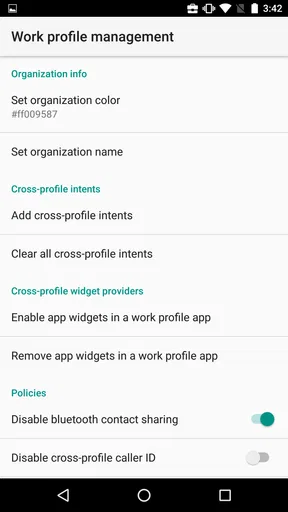
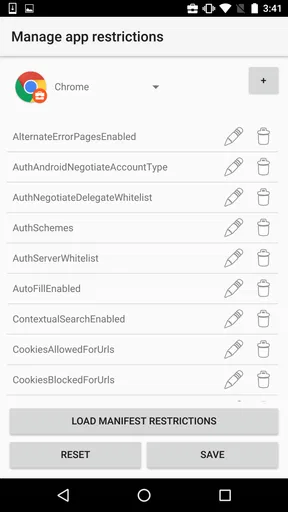
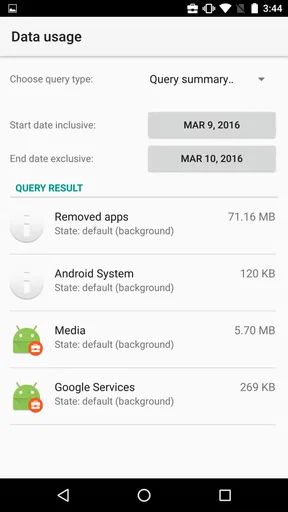
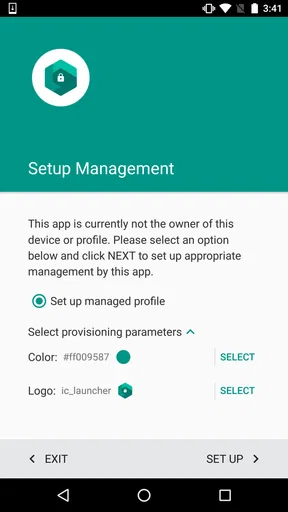
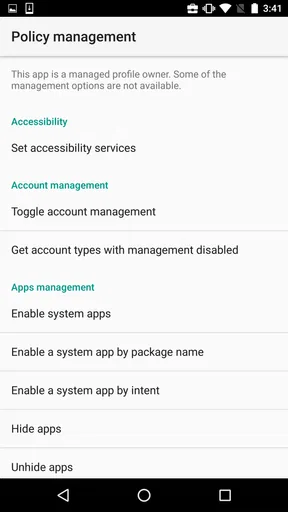
Our Review of Test DPC
 Analysis by Appyee
Test DPC is an unusual Android app because it is not aimed at everyday phone use. I approached it as a practical tool for examining Android Enterprise behavior, and that immediately shaped my expectations: this is a sample device policy controller from Google LLC, not a replacement for the settings app and not a general-purpose security utility. If you are curious about managed profiles, device-owner behavior, or app restrictions, it can be useful. If you simply want to organize your personal phone, it is probably the wrong download.
The app belongs to the Libraries & Demo category, is free to install, and carries an Everyone age rating. Its store presence shows over 500 thousand installs and an average rating of around four stars, which suggests a real audience without making it a mainstream consumer app. I also found that it supports Android six and later, while the current version is 9.0.16. Those details matter because compatibility is especially important for a tool that exists to demonstrate platform behavior rather than provide entertainment.
Understanding what Test DPC is really for
I find it helpful to treat Test DPC as a way to investigate one Android Enterprise question at a time, rather than as an app to explore casually. That framing also makes version changes easier to judge: I would compare what I observe on my test device with the behavior I need to understand, while keeping the device setup consistent.
A hands-on sample for Android Enterprise
The simplest way to understand this app is to think of it as a controlled interface for Android’s enterprise-management framework. A device policy controller sits between Android’s management capabilities and the person testing them. Instead of only reading about work profiles or managed devices, you can use the sample to see how policy-driven behavior feels on an Android device.
That makes the app valuable for developers, QA testers, students, technical writers, and administrators learning how Android Enterprise works. It can help you explore the difference between managing a separate work profile and managing a device more broadly. Those are not minor variations: they affect the boundary between personal data and organizational controls, so seeing the behavior directly is often more informative than relying on documentation alone.
I would not describe it as a polished productivity app. Its purpose is demonstration and testing, and that purpose explains the fairly technical experience. You are likely to encounter terminology and setup choices that make sense to someone studying device management but feel confusing to a casual Android owner. The app is most useful when you already have a question you want to investigate.
Why the free price changes the decision
There is no purchase price to weigh here: Test DPC is free. That makes experimentation easier, especially for a developer or learner who needs a practical way to inspect Android Enterprise concepts without committing money to a commercial management platform. Free access is the clearest part of its value proposition.
That does not mean the app has no cost in practice. The cost is mainly time, preparation, and the possibility of changing how a test device behaves. Device-management experiments are not the kind of activity I would begin casually on the phone that contains my everyday messages, photos, and work accounts. The app itself is free, but a sensible test setup may require a spare device, a clean profile, or a willingness to undo configuration changes afterward.
This distinction is important. A free sample controller can be excellent value for learning, but it is not automatically a free substitute for a complete enterprise-management service. It demonstrates Android’s management layer; it does not turn a personal phone into a full organizational administration system.
What the app can teach through direct testing
The most useful benefit is the ability to connect policy concepts with visible Android behavior. Reading that Android supports managed profiles is one thing. Watching a managed area appear, testing how applications are separated, and observing how administrative controls affect the device gives the idea more weight.
A particularly helpful workflow is to begin with one narrow question instead of enabling everything you see. For example, you might want to understand how a work profile differs from ordinary app accounts. Set up the smallest test you need, record what changes, and then remove or reset the test environment before moving to another experiment. This approach keeps the results easier to interpret and reduces the chance of confusing one policy with another.
Another worthwhile use is checking how an application behaves under management restrictions. A developer can use a controlled environment to think through cases such as a work-managed installation, profile separation, or a device where administrative rules affect access. The insight is not just whether an app launches; it is how the surrounding Android experience changes when management is involved.
Useful for development and troubleshooting
For Android developers, Test DPC can serve as a practical companion during enterprise-focused testing. It helps shift testing away from the assumption that every user has an unmanaged personal device. An application that behaves perfectly on a normal phone may need a different review when it is installed inside a managed profile or used on a device subject to organizational rules.
I see the strongest value here in early investigation. Before building a large test plan, a developer can use the sample controller to understand which Android Enterprise scenario is relevant and what questions need to be answered. It is not a magic diagnostic tool, but it can make the platform’s management model less abstract.
It can also help technical support teams reproduce a user’s environment more thoughtfully. If a problem appears only when an account or application is managed, testing in an unmanaged personal profile may lead to the wrong conclusion. A dedicated test setup gives the team a better chance of separating an application bug from a policy-related behavior.
Where it differs from ordinary Android settings
The standard Android Settings app is the better choice for normal device customization. It is designed for changing display options, accounts, notifications, connectivity, and personal preferences without requiring the user to think like an administrator. Test DPC has a different job: it exposes management scenarios that ordinary settings do not present as a learning environment.
Commercial enterprise-management platforms are also different. They usually focus on administering fleets, enrolling users, applying organizational rules, and providing operational tools for an IT team. Test DPC is better understood as a sample and learning instrument. It can help someone understand the foundation, but it should not be selected because it appears to offer the same complete workflow as a paid management product.
Compared with a documentation-only approach, the app has one clear advantage: it lets you observe Android directly. Compared with a production management platform, its advantage is accessibility and low financial commitment, while its limitation is that it is not the complete service an organization would normally use to manage a large collection of devices.
Practical friction before you begin
The first friction is conceptual. If you install the app expecting a dashboard of phone-cleaning tools, privacy switches, or everyday automation, the experience will feel misplaced. The category label, Libraries & Demo, is a better clue than the short name. This is a technical sample, and the useful results come from deliberate testing rather than casual tapping.
The second friction is the test environment itself. Device policy experiments can affect profile and device behavior, so I would keep this work away from a phone that is essential to daily communication. A spare Android device or a carefully isolated profile is a much better starting point. Before testing, I would also make sure I understand how I will return the device to its ordinary state.
The third friction is interpretation. A visible change does not always explain why it happened. Android version, profile type, enrollment state, and the exact policy being tested can all influence the result. I recommend changing one thing at a time and writing down the starting condition. That small habit turns the app from a confusing collection of controls into a more reliable learning tool.
Important tradeoffs for personal users
Personal users may be tempted to install it because the app is free and comes from Google LLC. I would still ask what problem they are trying to solve. If the goal is to separate work and personal applications, the phone’s built-in work-profile support or an employer-provided management solution may be more appropriate. Test DPC can help explain the technology, but it is not necessarily the easiest route to a stable personal setup.
There is also a tradeoff between experimentation and convenience. A managed environment can reveal useful behavior, but it may introduce extra steps when switching between personal and work areas. Someone who only wants quick access to two accounts may find the process heavier than expected. In that situation, ordinary account support inside the relevant applications may be the simpler option.
Privacy-minded users should be equally careful about the difference between learning about management and using management. A device policy controller exists in a sensitive part of Android’s architecture. That does not make the app unsuitable, but it does mean I would not install it without understanding the test purpose and the state I am willing to change. Curiosity alone is not a strong enough reason to experiment on a primary phone.
Who will get the most value
I would recommend Test DPC to an Android developer who needs to think about enterprise scenarios, a QA professional building managed-device test cases, or a student trying to understand Android Enterprise through direct practice. It also makes sense for technical educators who want to demonstrate the difference between a normal personal environment and a managed one.
It can be useful for an IT learner who wants to become familiar with the vocabulary and flow of Android device management before working with a commercial platform. The free price lowers the barrier to that first exploration, while the Android six minimum keeps it relevant to a broad range of supported devices.
A realistic everyday scenario would be a developer preparing an application for a company that uses managed Android phones. Instead of testing only on a personal handset, the developer creates a controlled environment, checks how the application behaves within a managed profile, notes any restrictions or unexpected prompts, and then compares those observations with the intended user experience. That is a focused use case where the app earns its place.
Who should choose something else
I would skip it if you are looking for a cleaner phone, stronger battery life, parental controls, a password manager, or a simple way to manage personal accounts. None of those needs matches its central purpose. The free price should not persuade you to install a technical tool that does not solve your actual problem.
Organizations that need centralized administration, reporting, enrollment workflows, support processes, and long-term fleet control should look at a dedicated enterprise-management product instead. Test DPC may help during evaluation or education, but it should not be treated as the final operational answer simply because it is made by Google.
I would also choose another option if your main goal is a polished demonstration for nontechnical users. The app is more useful when the person operating it already understands that policies, profiles, and device ownership are separate concepts. For a quick, friendly explanation, a guided training environment or the organization’s own management console may communicate the idea more clearly.
My verdict on its value
My opinion is positive, but narrowly so. Test DPC delivers real value when the goal is to inspect Android Enterprise behavior, learn how managed environments differ from personal ones, or support focused development and QA work. Its free access makes that exploration attractive, and the established audience reflected by its rating and install figures suggests that it has found the people it is meant to serve.
The tradeoff is that its usefulness depends almost entirely on your purpose. It is not a casual Android utility, and the learning curve is part of the product rather than a temporary inconvenience. You need a sensible test plan, a safe device or profile, and enough patience to interpret what you see. Without those, the app can feel more complicated than helpful.
If a friend told me they were studying Android Enterprise or testing an application for managed devices, I would recommend giving it a try. I would tell them to begin with a narrow experiment, avoid their primary phone, and treat every change as part of a controlled test. If they only wanted better personal phone management, I would point them toward Android’s normal settings or a purpose-built alternative instead.
In short, the buy-or-skip decision is simple because there is no purchase cost: choose it when you need a free, hands-on sample for Android management concepts, and skip it when you need a finished consumer or enterprise administration product. Its value comes from the questions it helps you investigate, not from replacing the tools used in everyday phone ownership.
Privacy and Permissions
See what permissions an app requests and how it handles your data.
- Identity
- find accounts on the device, add or remove accounts
- Contacts
- find accounts on the device
- Location
- approximate location (network-based), precise location (GPS and network-based)
- Photos/Media/Files
- read the contents of your USB storage, modify or delete the contents of your USB storage
- Storage
- read the contents of your USB storage, modify or delete the contents of your USB storage
- Wi-Fi connection information
- view Wi-Fi connections
- Other
- view network connections, connect and disconnect from Wi-Fi, full network access, run at startup, toggle sync on and off, read Google service configuration
Verdict
Strengths of Test DPC
- Useful for testing Android device policies and enterprise management features.
- Supports managed profiles and device-owner configurations for developers.
- Helps validate app behavior under restricted, supervised environments.
- Open-source project with transparent code for technical users.
- Can simulate many management scenarios without a full MDM platform.
Limitations of Test DPC
- Designed for testing, not everyday personal use or production management.
- Incorrect setup can restrict the device or interfere with normal settings.
- Some features require ADB access or advanced Android knowledge.
- May be incompatible with certain manufacturer-specific Android versions.
- Removing device-owner settings may require a factory reset in some cases.
Other Releases by Google LLC
View All
Google Calendar
Productivity4.6

Google Messages
Communication4.6

Tools4.0

Google TV
Video Players & Editors3.9
Similar Picks in This Category
View All
PGT: GFX, Launcher & Optimizer
Trilokia Inc.4.5

AusweisApp Bund
Governikus Service GmbH3.7

Cardboard
Google LLC3.2

Gamers GLTool with Game Tuner
Trilokia Inc.4.5

Multi Web Chat - Read Secretly
World Scan & Cleaner3.8

App Cloner Premium & Add-ons
App Listo1.9
Frequently Asked Questions
What is Test DPC used for?
Test DPC is a sample Android application designed for developers, testers, and IT administrators who need to evaluate Android enterprise and device-management features. It can act as a device policy controller in a test environment, allowing users to explore work profiles, managed settings, restrictions, and provisioning behavior without relying on a production management platform. It is not intended to be a regular consumer app.
Is Test DPC safe to install on my personal Android phone?
Test DPC is generally safe when downloaded from a trustworthy source, such as its official open-source distribution or a reputable app store. However, it can create a work profile, apply management policies, and change device behavior during testing. Before installing it on a personal phone, read every permission and provisioning prompt carefully, back up important data, and avoid using it on a device containing sensitive information unless you understand how to remove its policies.
Does Test DPC require root access?
No, Test DPC normally does not require root access. It uses Android’s standard device-management and device-policy APIs to demonstrate how a device policy controller works. Depending on the test scenario, Android may ask you to provision a work profile or set Test DPC as the device owner, and these operations can impose restrictions or require a freshly reset device. The exact behavior depends on the Android version and provisioning method.
Can Test DPC be used as a complete mobile device management solution?
No. Test DPC is primarily a reference and testing tool rather than a complete mobile device management platform. It is useful for experimenting with Android enterprise APIs and observing policy behavior, but it does not provide the administration dashboards, user management, reporting, support, security monitoring, and deployment workflow expected from a commercial MDM service. Organizations should use a dedicated, supported management solution for real business devices.
How do I remove Test DPC and its work profile?
The removal process depends on how Test DPC was provisioned. If it created a work profile, open Android Settings and look under Accounts, Passwords and accounts, or Work profile settings for an option to remove the profile. If Test DPC was configured as device owner, you may need to undo that configuration or perform a factory reset, especially on test devices. Back up personal data first, and do not uninstall the app alone if management policies are still active.
